
The Ultimate UK Smart Home Security Guide for 2026
By Elemon.co.uk — Products of Tomorrow… Today.
Secure Your Home Smarter, Not Harder
Home security has entered a new era. Gone are the days when protecting your property meant relying solely on a loud alarm, expensive monitoring contracts, and complicated wired installations. Today’s smart security systems combine high-definition cameras, intelligent sensors, AI-powered detection, and home automation to create a connected ecosystem that actively works to protect your home.
At Elemon.co.uk, we believe the best smart home technology should be practical, future-ready, and accessible to everyone. Whether you’re securing a city apartment, a suburban semi-detached home, or a countryside property, a well-planned DIY smart security setup can provide professional-level protection without the high installation costs.
This guide explores everything you need to know—from choosing the right cameras and sensors to building automation workflows that respond intelligently to everyday events and potential security threats.
Quick Facts
| Feature | Information |
|---|---|
| DIY Difficulty | ⭐⭐☆☆☆ Easy to Intermediate |
| Average Installation Time | 2–8 Hours |
| Typical UK Budget | £250–£1,500 |
| Best For | Homeowners, Renters, Families |
| Internet Required | Yes |
| Works With | Alexa, Google Home, Apple Home |
| Future Proof Rating | ⭐⭐⭐⭐⭐ |
| Maintenance | Low |
| Expandability | Excellent |
| Elemon Expert Rating | ⭐⭐⭐⭐⭐ (4.9/5) |
Table of Contents
- Why Smart Security Matters
- How Smart Home Security Works
- Planning Your DIY Security System
- Cameras Explained
- Smart Sensors
- Video Doorbells
- Smart Locks
- Smart Lighting
- Automation Workflows
- AI Features
- Local vs Cloud Storage
- Matter & Thread Compatibility
- Wi-Fi Planning
- Cost Breakdown
- Maintenance
- Common Mistakes
- FAQs
- Elemon Expert Verdict
Why Every UK Home Should Consider Smart Security
Homeowners today face different challenges than they did just a decade ago. Parcel theft has increased, remote working means valuable equipment is often left at home, and many families spend extended periods away from their property during holidays or work commitments.
Modern smart security addresses these concerns by offering continuous awareness of what’s happening around your home.
Unlike traditional alarm systems, today’s smart devices can:
- Detect movement with AI-powered accuracy
- Distinguish between people, pets, and vehicles
- Send instant notifications to your smartphone
- Record high-definition video
- Trigger lighting automatically
- Lock doors remotely
- Allow live communication with visitors
- Integrate with hundreds of other smart home devices
Instead of reacting after an incident occurs, smart security helps prevent incidents by making your home appear occupied, well-monitored, and difficult to access unnoticed.
Why Choose a DIY Smart Security Setup?
Installing your own smart security system offers several advantages over traditional professionally installed systems.
Lower Installation Costs
Professional alarm installations can easily exceed £1,500, especially when wiring is required.
DIY wireless systems often cost a fraction of that and require little more than a screwdriver and a smartphone.
No Long-Term Contracts
Many traditional security providers require:
- Monthly monitoring fees
- Multi-year service agreements
- Installation charges
- Equipment rental
DIY smart systems allow you to own your equipment outright and choose whether cloud subscriptions are worth paying for.
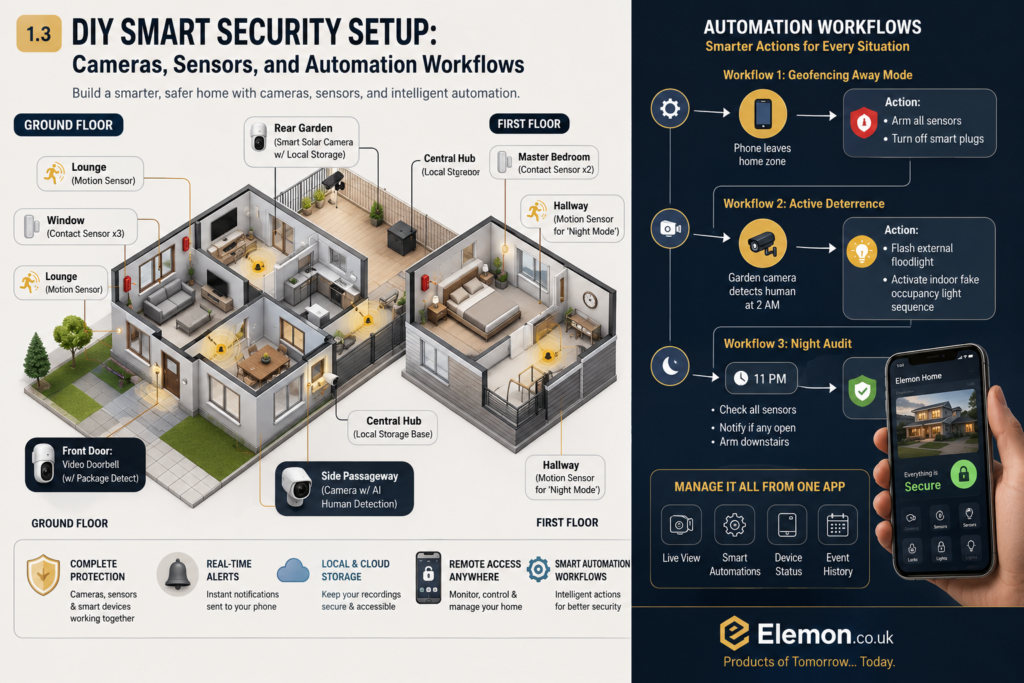
Easy to Expand
One of the greatest strengths of modern smart home ecosystems is flexibility.
You might begin with:
- One video doorbell
- Two outdoor cameras
- Three door sensors
As your needs grow, you can easily add:
- Garden cameras
- Garage sensors
- Smart locks
- Indoor cameras
- Leak detectors
- Smoke alarms
- Smart lighting
- Indoor sirens
Everything can be managed from the same app.
Remote Access
Wherever you are, your home is only a few taps away.
Whether you’re:
- At work
- On holiday
- Visiting family
- Shopping
You can:
- Watch live camera feeds
- Receive alerts
- Unlock doors
- Speak to visitors
- Check sensor status
- Review recordings
This level of control provides reassurance that traditional alarm systems simply cannot match.
How Smart Home Security Works
Unlike older alarm systems where each component worked independently, smart home security devices communicate with one another through your home network or dedicated smart home protocols.
A typical system consists of:
| Component | Purpose |
|---|---|
| Smart Cameras | Monitor indoor and outdoor areas |
| Motion Sensors | Detect movement |
| Door & Window Sensors | Detect openings |
| Smart Doorbell | Monitor visitors and deliveries |
| Smart Lock | Control access remotely |
| Smart Lighting | Deter unwanted visitors |
| Indoor/Outdoor Siren | Audible warning |
| Smart Hub (optional) | Coordinates devices and automations |
When connected together, these devices create an intelligent ecosystem rather than isolated gadgets.
For example:
A person walks onto your driveway after sunset. Your outdoor camera identifies a human, your floodlights illuminate the area, the camera begins recording, and your smartphone receives an instant alert—all within seconds.
Planning Your Home Security
Before buying equipment, spend a few minutes assessing your property.
Draw a simple map and identify:
- Front entrance
- Back door
- Patio doors
- Ground-floor windows
- Side gates
- Driveway
- Garage
- Garden office
- Shed
- Internal hallway
Think about how someone might approach your home.
Your goal is to create overlapping layers of security rather than relying on a single camera.
Home Security Planning Checklist
| Area | Recommended Protection |
|---|---|
| Front Door | Video Doorbell + Camera |
| Back Door | Camera + Door Sensor |
| Patio Doors | Contact Sensor + Motion Sensor |
| Ground Floor Windows | Window Sensors |
| Driveway | Camera + Floodlight |
| Side Gate | Camera |
| Garage | Camera + Motion Sensor |
| Garden | Motion Lighting |
| Hallway | Indoor Camera + Motion Sensor |
Understanding Smart Cameras
Cameras are often the first devices people purchase—and for good reason.
They provide visual evidence, real-time monitoring, and AI-powered alerts that help you understand what’s happening around your home.
Modern cameras can detect:
- People
- Vehicles
- Animals
- Packages
- Motion
- Sound
- Glass breaking (on some models)
Many also include:
- Colour night vision
- Spotlight illumination
- Two-way audio
- Local storage
- Cloud backup
- Smart AI recognition
Types of Smart Cameras
Indoor Cameras
Ideal for:
- Hallways
- Living rooms
- Home offices
- Children’s rooms
- Pet monitoring
Advantages:
- Compact
- Affordable
- Privacy shutters available
- Easy installation
Outdoor Cameras
Designed to withstand rain, wind, frost, and summer heat.
Ideal locations:
- Driveways
- Gardens
- Side access
- Rear entrances
- Garages
Look for:
- IP65 or higher weather resistance
- Night vision
- AI detection
- Wide viewing angles
Floodlight Cameras
These combine:
- HD Camera
- Motion Sensor
- Bright LED Floodlight
- Two-Way Audio
Excellent for:
- Driveways
- Rear gardens
- Side entrances
They act as both a security camera and a powerful deterrent.
Battery Cameras
Perfect for renters and locations without nearby power.
Pros:
- Easy installation
- Flexible placement
- No electrical work
Cons:
- Recharge every few months
Wired Cameras
Ideal for permanent installations.
Pros:
- Continuous recording
- No charging
- Reliable power
Cons:
- More complex installation
Smart Camera Comparison
| Camera Type | Best For | Installation | Recording | Overall Rating |
|---|---|---|---|---|
| Indoor Camera | Living Areas | ⭐ Easy | Cloud/Local | ⭐⭐⭐⭐☆ |
| Outdoor Camera | Entrances | ⭐⭐ Easy | Cloud/Local | ⭐⭐⭐⭐⭐ |
| Floodlight Camera | Driveways | ⭐⭐⭐ Medium | Cloud/Local | ⭐⭐⭐⭐⭐ |
| Battery Camera | Renters | ⭐ Easy | Cloud/Local | ⭐⭐⭐⭐☆ |
| Wired Camera | Permanent Security | ⭐⭐⭐ Intermediate | Continuous | ⭐⭐⭐⭐⭐ |
Elemon Expert Camera Ratings
| Feature | Rating |
|---|---|
| Image Quality | ⭐⭐⭐⭐⭐ |
| Night Vision | ⭐⭐⭐⭐⭐ |
| AI Detection | ⭐⭐⭐⭐⭐ |
| Ease of Installation | ⭐⭐⭐⭐☆ |
| Expandability | ⭐⭐⭐⭐⭐ |
| Value for Money | ⭐⭐⭐⭐☆ |
Choosing the Right Camera Resolution
Higher resolution generally provides better image detail, but it also increases storage requirements.
| Resolution | Best Use | Recommendation |
|---|---|---|
| 1080p Full HD | Indoor Cameras | ⭐⭐⭐⭐☆ |
| 2K | Most Homes | ⭐⭐⭐⭐⭐ |
| 4K Ultra HD | Large Properties | ⭐⭐⭐⭐⭐ |
| 720p | Budget Systems | ⭐⭐☆☆☆ |
For most UK households, 2K resolution offers the best balance between image quality, storage efficiency, and affordability.
Smart Sensors — The Silent Protectors
While cameras often receive the most attention, sensors are the foundation of every effective smart security system. Cameras show you what happened, but sensors are usually the first devices to detect that something is happening.
Unlike cameras, sensors consume very little power, making them ideal for continuous monitoring. Many battery-powered sensors can operate for two to five years before needing a replacement battery.
A well-designed system typically combines several different sensor types, each with a specific purpose.
Door Sensors
Door sensors consist of two magnetic components. One is attached to the door frame and the other to the door itself. When the door opens, the magnetic connection breaks and the system immediately detects the change.
They are ideal for:
- Front doors
- Back doors
- Patio doors
- Garage access doors
- Garden office entrances
Door sensors can also trigger automations such as:
- Turning on hallway lights
- Sending phone notifications
- Starting camera recording
- Activating indoor sirens
- Logging entry events
Window Sensors
Window sensors work in much the same way as door sensors but are designed for opening windows.
They are particularly useful for:
- Ground-floor windows
- Conservatories
- Basement windows
- Side-access windows
They can also remind you if windows remain open when rain is forecast or when your heating is running.
Motion Sensors
Passive Infrared (PIR) sensors detect changes in heat signatures caused by people moving through a room.
Common installation areas include:
- Hallways
- Staircases
- Living rooms
- Garages
- Utility rooms
Many modern motion sensors can ignore pets weighing up to approximately 25 kg, helping reduce false alarms.
Glass Break Sensors
These specialist sensors detect the unique sound frequency produced when glass shatters.
Recommended locations include:
- Conservatories
- Patio doors
- Large windows
- Shopfront-style glazing
- Garden rooms
Unlike standard contact sensors, they can detect break-ins even if the window isn’t opened.
Environmental Sensors
Modern smart homes can also monitor environmental hazards.
Examples include:
- Water leak sensors
- Smoke detectors
- Carbon monoxide detectors
- Temperature sensors
- Humidity sensors
- Freeze sensors
Although primarily safety devices, they can integrate with the same smart home platform as your security system.
Smart Sensor Comparison
| Sensor Type | Detects | DIY Difficulty | Battery Life | Security Rating |
|---|---|---|---|---|
| Door Sensor | Door Opening | ⭐ Very Easy | 2–5 Years | ⭐⭐⭐⭐⭐ |
| Window Sensor | Window Opening | ⭐ Very Easy | 2–5 Years | ⭐⭐⭐⭐☆ |
| Motion Sensor | Movement | ⭐ Very Easy | 2–4 Years | ⭐⭐⭐⭐⭐ |
| Glass Break Sensor | Broken Glass | ⭐⭐ Easy | 2–4 Years | ⭐⭐⭐⭐☆ |
| Leak Sensor | Water | ⭐ Very Easy | 3–5 Years | ⭐⭐⭐⭐☆ |
| Smoke Detector | Smoke | ⭐⭐ Easy | 5–10 Years | ⭐⭐⭐⭐⭐ |
| Carbon Monoxide Sensor | CO Gas | ⭐⭐ Easy | 5–10 Years | ⭐⭐⭐⭐⭐ |
Elemon Sensor Ratings
| Category | Rating |
|---|---|
| Ease of Installation | ⭐⭐⭐⭐⭐ |
| Reliability | ⭐⭐⭐⭐⭐ |
| Battery Life | ⭐⭐⭐⭐⭐ |
| Expandability | ⭐⭐⭐⭐⭐ |
| Value for Money | ⭐⭐⭐⭐⭐ |
Video Doorbells
The smart video doorbell has become one of the most popular home security devices in the UK.
Rather than simply notifying you when someone presses the button, today’s models can detect motion before a visitor reaches your door.
Typical features include:
- HD video
- AI person detection
- Package detection
- Two-way communication
- Night vision
- Motion alerts
- Visitor history
- Cloud or local recording
Whether you’re upstairs, at work, or abroad, you can answer your front door from your smartphone.
Video Doorbell Comparison
| Feature | Budget | Mid-Range | Premium |
|---|---|---|---|
| HD Video | ✅ | ✅ | ✅ |
| 2K Video | ❌ | ✅ | ✅ |
| Package Detection | ❌ | ✅ | ✅ |
| Colour Night Vision | ❌ | Optional | ✅ |
| AI Person Detection | Basic | Advanced | Premium |
| Local Storage | Some | Yes | Yes |
| Smart Home Integration | Good | Excellent | Excellent |
Smart Locks
Smart locks provide a secure and convenient way to control access without relying solely on traditional keys.
Common unlocking methods include:
- Smartphone
- Fingerprint
- PIN code
- NFC card
- Temporary access codes
- Physical key backup
Perfect for:
- Families
- Holiday lets
- Airbnb properties
- Elderly relatives
- Tradespeople
- Cleaner access
Many locks automatically secure the door after it closes, helping prevent accidental unlocks.
Smart Lock Comparison
| Feature | Basic | Premium |
|---|---|---|
| Smartphone Unlock | ✅ | ✅ |
| Fingerprint | Optional | ✅ |
| Auto Lock | Optional | ✅ |
| Temporary Codes | ✅ | ✅ |
| Activity History | Basic | Detailed |
| Matter Support | Some | Most New Models |
Smart Lighting as a Security Tool
Lighting plays a crucial role in deterring opportunistic criminals.
A well-lit property is less attractive than one hidden in darkness.
Smart lighting allows you to automate:
- Garden lights
- Pathway lights
- Porch lights
- Garage lighting
- Floodlights
- Indoor occupancy simulation
Smart Lighting Comparison
| Lighting Type | Best Location | Automation | Security Rating |
|---|---|---|---|
| Porch Light | Front Door | Sunset/Motion | ⭐⭐⭐⭐☆ |
| Floodlight | Driveway | Motion | ⭐⭐⭐⭐⭐ |
| Garden Lights | Paths | Schedule | ⭐⭐⭐⭐☆ |
| Indoor Lamps | Living Areas | Occupancy Simulation | ⭐⭐⭐⭐⭐ |
| Garage Light | Garage | Motion | ⭐⭐⭐⭐☆ |
Indoor & Outdoor Sirens
Although cameras and sensors provide excellent monitoring, an audible alarm still has an important role.
A siren can:
- Scare away intruders
- Alert neighbours
- Confirm the alarm has been triggered
- Draw attention to suspicious activity
Modern sirens can also flash built-in LED warning lights.
Automation — Where Smart Homes Become Truly Intelligent
The biggest advantage of today’s DIY systems is automation.
Rather than operating independently, every device can respond to events across your home.
Instead of saying:
“If motion is detected…”
Modern automation says:
“If a person is detected after sunset while nobody is home, switch on the floodlights, begin recording, lock the smart door, notify my phone, and activate the siren after 30 seconds unless cancelled.”
That level of intelligent response dramatically increases both convenience and security.
Workflow 1 — Leaving Home
Trigger:
Your smartphone leaves the property’s geofenced area.
Actions:
- Lock smart doors
- Arm cameras
- Activate motion sensors
- Switch off unnecessary lights
- Turn off selected smart plugs
- Enable holiday recording mode
| Convenience | ⭐⭐⭐⭐⭐ |
|---|---|
| Security | ⭐⭐⭐⭐⭐ |
| Energy Saving | ⭐⭐⭐⭐☆ |
Workflow 2 — Arriving Home
Trigger:
Your smartphone enters the geofence.
Actions:
- Unlock door (optional)
- Turn on hallway lights
- Disarm alarm
- Resume indoor privacy mode
- Adjust heating
- Play welcome music
Overall Rating:
⭐⭐⭐⭐⭐
Workflow 3 — Night Security Mode
At a scheduled time (for example, 11:00 PM):
- Lock doors
- Arm outdoor cameras
- Activate window sensors
- Enable driveway motion alerts
- Turn off downstairs lights
- Keep bedroom pathways dimly illuminated
Overall Rating:
⭐⭐⭐⭐⭐
Workflow 4 — Intruder Detection
Trigger:
Camera identifies a person approaching the rear garden after midnight.
Automation:
- Floodlights activate.
- Camera begins recording.
- Notification sent.
- Smart speaker announces movement.
- Siren activates if movement continues.
- Video uploaded securely.
This layered response often discourages intruders before they reach your home.
Workflow 5 — Parcel Delivery
Trigger:
Video doorbell identifies a package.
Automation:
- Save video clip
- Notify smartphone
- Announce delivery through smart speaker
- Illuminate porch light if dark
Overall Rating:
⭐⭐⭐⭐☆
Workflow 6 — Holiday Mode
Before travelling:
Enable Holiday Mode.
Your home will:
- Randomly switch indoor lights on and off
- Activate all outdoor cameras
- Increase motion sensitivity
- Monitor every entry point
- Notify you instantly of activity
This creates the appearance that someone is still at home.
Workflow Comparison
| Workflow | Convenience | Security | Energy Saving | Overall |
|---|---|---|---|---|
| Leaving Home | ⭐⭐⭐⭐⭐ | ⭐⭐⭐⭐⭐ | ⭐⭐⭐⭐☆ | ⭐⭐⭐⭐⭐ |
| Arriving Home | ⭐⭐⭐⭐⭐ | ⭐⭐⭐⭐☆ | ⭐⭐⭐⭐☆ | ⭐⭐⭐⭐⭐ |
| Night Mode | ⭐⭐⭐⭐☆ | ⭐⭐⭐⭐⭐ | ⭐⭐⭐☆☆ | ⭐⭐⭐⭐⭐ |
| Holiday Mode | ⭐⭐⭐⭐☆ | ⭐⭐⭐⭐⭐ | ⭐⭐⭐⭐☆ | ⭐⭐⭐⭐⭐ |
| Parcel Detection | ⭐⭐⭐⭐⭐ | ⭐⭐⭐⭐☆ | ⭐⭐⭐☆☆ | ⭐⭐⭐⭐☆ |
| Intruder Response | ⭐⭐⭐☆☆ | ⭐⭐⭐⭐⭐ | ⭐⭐⭐☆☆ | ⭐⭐⭐⭐⭐ |
Building Your System in Stages
You don’t need to buy everything at once. A phased approach makes it easier to spread the cost and learn your system over time.
| Stage | Recommended Equipment | Estimated Cost |
|---|---|---|
| Stage 1 | Video Doorbell + Outdoor Camera | £150–£350 |
| Stage 2 | Door & Window Sensors | £80–£200 |
| Stage 3 | Motion Sensors + Smart Lighting | £150–£400 |
| Stage 4 | Smart Lock + Indoor Camera | £250–£600 |
| Stage 5 | Leak, Smoke & CO Sensors | £100–£300 |
Artificial Intelligence Is Changing Home Security
Artificial Intelligence (AI) has transformed modern home security from simple motion detection into intelligent event recognition.
Older systems often recorded everything—moving trees, heavy rain, passing cars, or pets—resulting in countless false notifications.
Today’s AI-powered cameras analyse scenes in real time and identify exactly what is happening.
Many modern smart cameras can recognise:
- People
- Vehicles
- Pets
- Parcels
- Faces (where supported)
- Animal movement
- Suspicious loitering
- Motion direction
- Crossing virtual boundaries
Some premium systems even allow you to define activity zones, ensuring alerts are triggered only in the areas that matter most.
For example, you might ignore movement on a public pavement while receiving instant notifications if someone enters your driveway or garden.
AI Feature Comparison
| AI Feature | Entry Level | Mid-Range | Premium |
|---|---|---|---|
| Motion Detection | ✅ | ✅ | ✅ |
| Person Detection | Basic | Advanced | AI Enhanced |
| Vehicle Detection | ❌ | ✅ | ✅ |
| Pet Detection | ❌ | Optional | ✅ |
| Package Detection | ❌ | ✅ | ✅ |
| Facial Recognition* | ❌ | Limited | Available |
| Activity Zones | Basic | Advanced | Fully Customisable |
*Availability varies by manufacturer and region.
Local Storage vs Cloud Recording
One of the biggest decisions when building a smart security system is how your recordings will be stored.
Local Storage
Footage is stored directly on the device, memory card, network video recorder (NVR), or home server.
Advantages
- No monthly subscription
- Greater privacy
- Faster playback
- Full ownership of recordings
- Internet outages don’t always affect recording
Disadvantages
- Limited storage capacity
- Device theft could result in footage loss if no backup exists
- Some advanced AI features may be unavailable
Cloud Storage
Recordings are securely uploaded to remote servers and can be accessed from anywhere.
Advantages
- Off-site backup
- Easy remote access
- Automatic software improvements
- Longer event history
- Convenient sharing with family members
Disadvantages
- Ongoing subscription costs
- Dependent on internet connectivity
- Privacy considerations if footage is stored externally
Storage Comparison
| Feature | Local Storage | Cloud Storage |
|---|---|---|
| Monthly Fees | None | Usually Required |
| Remote Access | Limited | Excellent |
| Privacy | ⭐⭐⭐⭐⭐ | ⭐⭐⭐⭐☆ |
| Theft Protection | ⭐⭐⭐☆☆ | ⭐⭐⭐⭐⭐ |
| Long-Term History | ⭐⭐⭐☆☆ | ⭐⭐⭐⭐⭐ |
| Overall Flexibility | ⭐⭐⭐⭐☆ | ⭐⭐⭐⭐⭐ |
Elemon Tip: A hybrid setup—using local storage for immediate access and cloud storage for critical backups—often provides the best balance between privacy, resilience, and convenience.
Matter & Thread: Building a Future-Proof Smart Home
When investing in smart devices, compatibility matters just as much as features.
Two technologies are becoming increasingly important:
Matter
Matter is a universal smart home standard that allows compatible devices from different manufacturers to work together more easily.
Benefits include:
- Easier setup
- Improved interoperability
- Reduced reliance on proprietary ecosystems
- Greater long-term compatibility
Thread
Thread is a low-power wireless networking protocol designed specifically for smart home devices.
Benefits include:
- Faster communication
- Improved reliability
- Self-healing mesh networking
- Better battery efficiency
Choosing devices that support Matter and Thread where appropriate can help your system remain compatible as smart home technology evolves.
Connectivity Comparison
| Device | Wi-Fi | Zigbee | Thread | Matter Ready |
|---|---|---|---|---|
| Smart Camera | ✅ | ❌ | ❌ | Some Models |
| Video Doorbell | ✅ | ❌ | ❌ | Some Models |
| Motion Sensor | Optional | ✅ | ✅ | Many Models |
| Door Sensor | Optional | ✅ | ✅ | Many Models |
| Smart Lock | ✅ | ✅ | ✅ | Most New Models |
| Smart Lighting | Optional | ✅ | ✅ | Increasingly Common |
Planning Your Home Wi-Fi
Your security system is only as reliable as the network supporting it.
Weak wireless coverage can lead to delayed notifications, dropped camera feeds, or devices going offline.
To improve reliability:
- Position your router centrally where practical.
- Consider a mesh Wi-Fi system for larger homes.
- Avoid placing routers inside cupboards or behind large metal objects.
- Keep firmware updated.
- Use strong WPA2/WPA3 encryption and unique passwords.
- Test Wi-Fi signal strength before installing outdoor devices.
For larger detached properties or homes with garden offices, a mesh network often provides more consistent coverage than a single router.
Typical UK Cost Breakdown
DIY security systems are highly scalable, allowing you to start small and expand over time.
| Home Type | Budget Setup | Mid-Range Setup | Premium Setup |
|---|---|---|---|
| Flat / Apartment | £250–£450 | £500–£800 | £900–£1,300 |
| Terraced House | £350–£650 | £700–£1,100 | £1,400–£2,000 |
| Semi-Detached | £450–£750 | £900–£1,500 | £1,800–£2,600 |
| Detached House | £700–£1,100 | £1,500–£2,500 | £3,000+ |
These figures will vary depending on the number of cameras, sensors, smart locks, and whether cloud subscriptions are used.
Installation Difficulty Guide
| Device | Average Installation Time | Skill Level |
|---|---|---|
| Door Sensor | 5 Minutes | ⭐ Beginner |
| Window Sensor | 5 Minutes | ⭐ Beginner |
| Indoor Camera | 10 Minutes | ⭐ Beginner |
| Outdoor Camera | 20–40 Minutes | ⭐⭐ Easy |
| Video Doorbell | 20–45 Minutes | ⭐⭐ Easy |
| Motion Sensor | 10 Minutes | ⭐ Beginner |
| Smart Floodlight | 60–90 Minutes | ⭐⭐⭐ Intermediate |
| Smart Lock | 45–90 Minutes | ⭐⭐⭐ Intermediate |
Maintenance Schedule
Like any technology, smart security devices perform best when maintained regularly.
| Maintenance Task | Frequency | Importance |
|---|---|---|
| Clean camera lenses | Monthly | ⭐⭐⭐⭐⭐ |
| Check batteries | Every 3–6 Months | ⭐⭐⭐⭐⭐ |
| Review automation routines | Monthly | ⭐⭐⭐⭐☆ |
| Install firmware updates | Monthly | ⭐⭐⭐⭐⭐ |
| Test alarms and sensors | Every 3 Months | ⭐⭐⭐⭐⭐ |
| Check Wi-Fi coverage | Every 6 Months | ⭐⭐⭐⭐☆ |
| Review user permissions | Every 6 Months | ⭐⭐⭐⭐☆ |
Common DIY Installation Mistakes
Avoid these common pitfalls to get the best performance from your system:
- Positioning cameras directly into bright sunlight.
- Mounting cameras too high to capture useful facial detail.
- Ignoring Wi-Fi dead zones.
- Forgetting to update firmware.
- Leaving default passwords unchanged.
- Creating overlapping motion zones that generate unnecessary alerts.
- Neglecting regular battery checks.
- Failing to test automation routines after installation.
Taking time to plan and test your setup will improve both reliability and day-to-day usability.
Advantages and Disadvantages
| Advantages | Disadvantages |
|---|---|
| Lower installation costs | Battery-powered devices require periodic maintenance |
| Expandable over time | Some advanced features need subscriptions |
| Remote monitoring from anywhere | Performance depends on a stable internet connection |
| Intelligent automation | Premium devices can be expensive |
| AI-powered detection reduces false alerts | Initial setup requires careful planning |
| Greater flexibility than many traditional alarm systems | Multiple apps may be needed if devices use different ecosystems |
Frequently Asked Questions
Do I need professional installation?
No. Most modern wireless devices are designed for DIY installation using adhesive pads or basic fixings.
Can I install smart security in a rented property?
Yes. Battery-powered cameras, door sensors, and video doorbells are often suitable for renters because they require minimal permanent modifications.
Will smart cameras work without Wi-Fi?
Many cameras can continue recording locally, but remote access, live viewing, and instant notifications generally require an internet connection.
Are smart security systems expensive to run?
Most devices use very little electricity. Ongoing costs are usually limited to optional cloud storage subscriptions and occasional battery replacements.
Can smart security reduce false alarms?
Yes. AI-powered person, vehicle, and pet detection helps minimise unnecessary notifications compared with older motion-only systems.
Is local storage better than cloud storage?
It depends on your priorities. Local storage offers greater privacy and no subscription fees, while cloud storage provides secure off-site backups and easier remote access.
How many cameras do I need?
The answer depends on your property. Many homes achieve good coverage with two to four strategically positioned cameras rather than covering every angle.
Can I expand my system later?
Absolutely. One of the biggest advantages of DIY smart security is that you can add cameras, sensors, locks, and lighting over time.
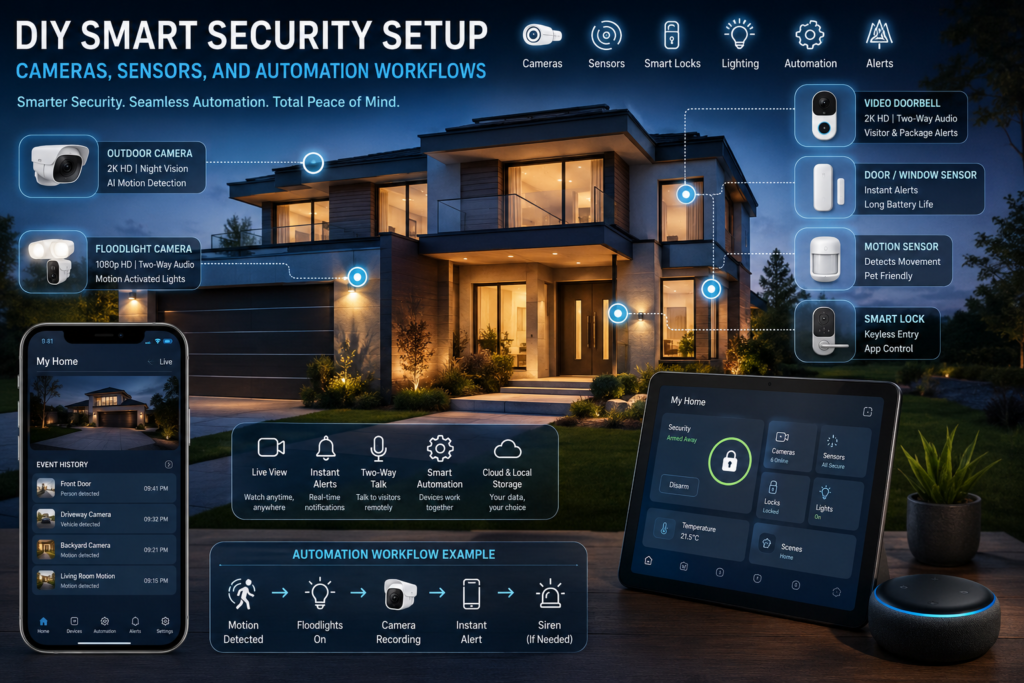
My Experience: In our experience, the most effective DIY smart security systems aren’t necessarily the most expensive—they’re the ones that are thoughtfully planned.
A balanced combination of cameras, sensors, smart lighting, and practical automation usually provides stronger everyday protection than simply adding more cameras.
Starting with the essentials and expanding gradually also gives you time to understand how your home is used, fine-tune notifications, and reduce false alerts. A well-configured system should feel helpful and reassuring, not intrusive or overwhelming.
Key Takeaways
- Smart security is most effective when cameras, sensors, lighting, and automation work together.
- Begin with essential entry points and expand over time.
- AI-powered detection significantly reduces false notifications.
- Matter and Thread support can improve long-term compatibility.
- Reliable Wi-Fi and regular firmware updates are essential.
- Routine maintenance keeps your system dependable.
- Thoughtful planning is often more valuable than buying the most expensive equipment.
Elemon Expert Ratings
| Feature | Rating | Comments |
|---|---|---|
| Ease of Installation | ⭐⭐⭐⭐⭐ | Most wireless devices can be installed in a few hours. |
| Smart Features | ⭐⭐⭐⭐⭐ | Automation and AI provide impressive everyday convenience. |
| Home Protection | ⭐⭐⭐⭐⭐ | Layered security offers excellent coverage. |
| Reliability | ⭐⭐⭐⭐☆ | Strong performance when supported by a reliable network. |
| Privacy Controls | ⭐⭐⭐⭐☆ | Local storage and two-factor authentication improve privacy. |
| Expandability | ⭐⭐⭐⭐⭐ | Easy to add new devices as your needs grow. |
| Value for Money | ⭐⭐⭐⭐☆ | Excellent long-term value compared with many monitored systems. |
| Future Proofing | ⭐⭐⭐⭐⭐ | Matter and Thread support help keep systems relevant. |
Overall Elemon Verdict
| Category | Score |
|---|---|
| Installation | ⭐⭐⭐⭐⭐ (5.0/5) |
| Smart Features | ⭐⭐⭐⭐⭐ (5.0/5) |
| Home Protection | ⭐⭐⭐⭐⭐ (5.0/5) |
| Ease of Use | ⭐⭐⭐⭐☆ (4.8/5) |
| Value for Money | ⭐⭐⭐⭐☆ (4.8/5) |
| Expandability | ⭐⭐⭐⭐⭐ (5.0/5) |
| Overall Rating | ⭐⭐⭐⭐⭐ (4.9/5) |
Editor’s Recommendation
A DIY smart security system offers one of the best returns on investment for homeowners looking to improve safety, convenience, and peace of mind. By combining quality cameras, dependable sensors, intelligent automation, and regular maintenance, you can build a system that adapts to your home and continues to grow with future technologies.
Related Articles on Elemon.co.uk
- Smart Home Starter Guide for UK Homes
- Best Smart Security Cameras (UK Edition)
- Choosing the Right Video Doorbell
- Smart Lighting Automation Ideas
- Smart Home Wall Panel Guide
- Smart Thermostat Calibration Guide
- Solar vs Wired Garden Lights
- Home Wi-Fi Optimisation for Smart Devices
UK Safety & Privacy Considerations
If your cameras capture areas beyond your property’s boundary, such as public footpaths or neighbouring gardens, you may have responsibilities under UK privacy and data protection laws. Position cameras carefully, secure your recordings, enable two-factor authentication where available, and respect the privacy of others. For mains-powered outdoor installations or electrical modifications, consult a qualified electrician if you are unsure.
Affiliate Disclosure: Some articles on Elemon.co.uk may include affiliate links “Amazon associate“. If you purchase products through these links, we may earn a small commission at no additional cost to you. This helps support our independent reviews, testing, and in-depth smart home guides. Our recommendations are based on research and practical value—not on affiliate partnerships.
Elemon.co.uk — Products of Tomorrow… Today.
![Yale SK1 Smart Home Alarm 6 piece kit [NO SUBS NEEDED] Includes S...](https://m.media-amazon.com/images/I/31QH+IH2KuL._AC_.jpg)