
Budget vs Premium – Building the Perfect Workspace
Working from home has become a permanent reality for many people, making a comfortable and productive workspace more important than ever. The good news is that creating an effective home office doesn’t require spending thousands of pounds. Whether you’re working with a tight budget or planning a premium setup, smart choices can transform any spare room, bedroom corner, or garden office into a space where productivity thrives.
This guide compares budget-friendly solutions with premium upgrades, helping you decide where to save and where to invest for the best long-term results.
Start with the Essentials: Desk and Chair
The foundation of every home office is a desk and chair. While many people focus on gadgets and accessories, comfort should always come first.
Budget Approach
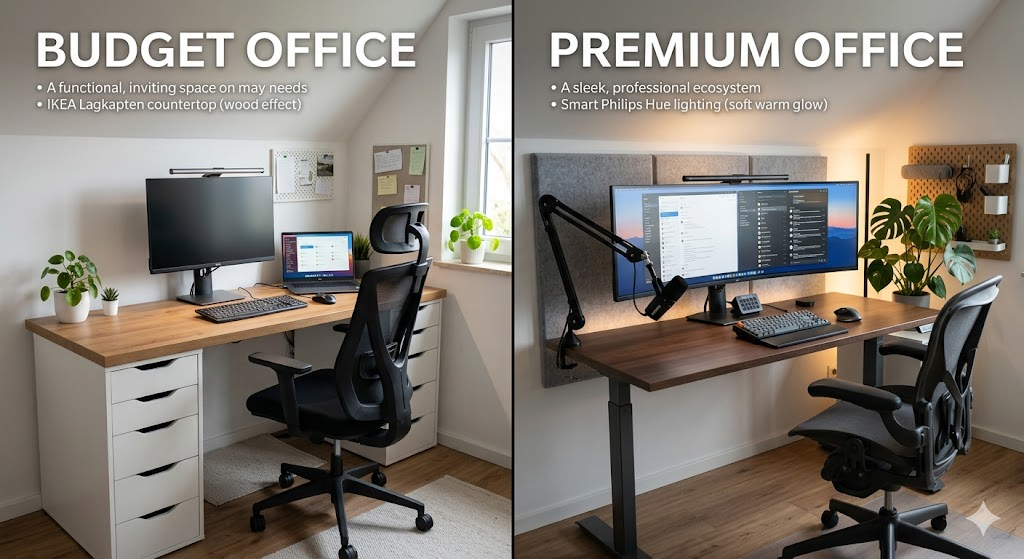
A simple DIY desk can provide excellent value. Many homeowners create large work surfaces using drawer units and a countertop, offering plenty of workspace without the premium price tag. This approach also allows you to customize the dimensions to fit your room.
For seating, avoid the cheapest office chairs available online. Instead, look for ergonomic mesh chairs with lumbar support or browse local marketplaces for second-hand office furniture from commercial offices. Quality used chairs often outperform brand-new budget models.
Disclosure: As an Amazon Associate, Elemon.co.uk earns from qualifying purchases at no extra cost to you.

Premium Approach
Premium workspaces often feature electric standing desks that allow users to switch between sitting and standing throughout the day. Many models include programmable height settings, integrated cable management, and durable steel frames.
Pairing a standing desk with a high-end ergonomic chair creates a workspace designed for long hours of comfort. Premium chairs offer advanced support systems that help reduce fatigue and encourage healthier posture during extended work sessions.
Display and Technology Setup
Technology can significantly impact workflow efficiency, especially for professionals who spend hours working on computers.
Budget Setup
A single 24-inch or 27-inch monitor remains the sweet spot for most users. Combined with a reliable keyboard and mouse, this setup provides excellent functionality without excessive expense.
Additional affordable upgrades include:
- Laptop stand for improved screen height
- USB hub for extra connectivity
- Wired peripherals for reliability
- Basic webcam for video meetings
Premium Setup
Professionals who multitask extensively may benefit from dual-monitor configurations or large ultrawide displays. These setups reduce window switching and provide more screen space for productivity.
Premium peripherals often include:
- Mechanical keyboards
- Productivity-focused wireless mice
- High-resolution webcams
- Studio-quality microphones
- Noise-cancelling headphones
These upgrades enhance both workflow and communication quality during virtual meetings.
Lighting Makes a Bigger Difference Than You Think
Poor lighting contributes to eye strain, headaches, and reduced concentration.
Budget Lighting Solutions
Natural daylight remains the most effective and affordable lighting source. Position your desk near a window while avoiding direct glare on screens.
Adding a monitor light bar is another inexpensive upgrade that illuminates the desk surface without creating reflections on the display.
Premium Lighting Systems
Premium home offices often incorporate layered lighting solutions, including:
- Smart ambient lighting
- Adjustable task lighting
- Monitor bias lighting
- Automated schedules and scenes
These systems can adapt throughout the day, supporting focus during work hours and relaxation after work is complete.
Keeping Your Workspace Organised
A cluttered desk often leads to a cluttered mind.
Budget Organisation
Simple cable clips, Velcro straps, and under-desk baskets can dramatically improve workspace appearance. DIY desk organisers made from timber offcuts or recycled containers provide functional storage without additional cost.
Premium Organisation
Higher-end setups frequently include:
- Integrated cable trays
- Magnetic cable routing systems
- Dedicated charging stations
- Custom storage solutions
The result is a cleaner, more professional-looking workspace with minimal visible clutter.
Improving Acoustics and Comfort
As remote meetings become increasingly common, room acoustics deserve attention.
Budget Improvements
Soft furnishings such as curtains, rugs, and bookshelves naturally absorb sound reflections and reduce echo.
Premium Enhancements
Acoustic wall panels have become a popular upgrade for home offices. They improve call quality while adding visual interest to the room. Modern acoustic panels are available in various colours and designs, allowing them to function as both practical and decorative elements.
Budget vs Premium: Which Is Right for You?
A budget home office can often be assembled for less than £500 and still provide excellent comfort and productivity. Meanwhile, premium workspaces may cost several thousand pounds but deliver superior ergonomics, aesthetics, and convenience.
The key is understanding where your money has the greatest impact.
Worth Investing In
- Ergonomic chair
- Quality monitor
- Reliable keyboard and mouse
- Proper lighting
Areas Where You Can Save
- Desk construction
- Decorative accessories
- Basic cable management
- Storage solutions
Final Thoughts
The best home office isn’t necessarily the most expensive one. A carefully planned DIY workspace can rival premium setups in functionality while costing a fraction of the price. Start with the essentials, focus on comfort and ergonomics, and upgrade gradually as your needs evolve.
Whether you’re building a simple workstation for occasional remote work or a professional environment for daily use, smart planning will always deliver better results than simply buying the most expensive equipment available.


My Experience
Over the years, I’ve experimented with several home office setups, ranging from basic DIY desks built on a limited budget to more advanced workspaces with ergonomic furniture and dedicated lighting. One lesson I’ve learned is that comfort and practicality matter far more than expensive gadgets.
My first home office consisted of a simple desk, a second-hand ergonomic chair, and a single monitor. Despite the modest setup, it allowed me to work productively because I focused on the essentials. As my needs grew, I gradually upgraded components such as lighting, monitor quality, and cable management rather than replacing everything at once.
If I were starting again today, I would invest first in a quality chair and monitor, then improve the workspace over time. This approach provides the best balance between cost and long-term comfort.
Key Takeaways
✔ A comfortable chair should be your first investment.
✔ A DIY desk can provide excellent value compared to premium alternatives.
✔ Good lighting reduces eye strain and improves productivity.
✔ A single quality monitor is often sufficient for most home-office users.
✔ Effective cable management makes any workspace look cleaner and more professional.
✔ Smart upgrades should be introduced gradually rather than all at once.
✔ Budget setups can be highly productive when designed thoughtfully.
Related Articles
You may also find these guides helpful:
- DIY Smart Home Wall Panel (LED + Acoustic Foam)
- Build a Modern Pergola: DIY Outdoor Living Guide
- Outdoor Solar Lighting Guide for UK Homes
- Smart Shopper’s Guide: Where to Buy Tech and Smart Home Gear in the UK
- Build a Raised Garden Bed: Step-by-Step DIY Project
- Home Automation Ideas for Beginners
- DIY Cable Management Solutions for Home Offices
- Best Budget Smart Home Devices for UK Households
UK Regulations & Safety Information
Before carrying out any DIY modifications to your home office, consider the following:
- Ensure electrical installations comply with current UK electrical safety requirements.
- Avoid overloading extension leads and power strips.
- Use surge-protected power strips where appropriate for computers and sensitive electronics.
- Follow manufacturer instructions when assembling desks, chairs, and storage units.
- Secure heavy furniture to walls if there is a risk of tipping.
- Maintain adequate ventilation around electronic equipment to prevent overheating.
- If undertaking electrical work beyond simple plug-and-play installation, consult a qualified electrician.
Regulations and requirements may change over time. Always verify current guidance before starting any project
Disclaimer
This article is provided for informational and educational purposes only. The information reflects personal experience and general DIY guidance. Every property, workspace, and user’s requirements are different.
Elemon.co.uk accepts no responsibility for injury, loss, damage, or inconvenience resulting from the use of information contained in this guide. Readers should conduct their own research, follow manufacturer instructions, and seek professional advice where necessary.
Product recommendations and examples mentioned are based on general market availability at the time of writing and should not be considered professional endorsements.
Image Disclaimer; All images are for reference purposes only. Actual products, materials, layouts, colours, and finished results may vary. Readers should rely on manufacturer specifications and their own measurements when planning projects or purchasing equipment.


Affiliate Disclaimer
Elemon.co.uk participates in the Amazon Services LLC Associates Program and other affiliate advertising programmes designed to provide a means for websites to earn advertising fees by advertising and linking to Amazon.co.uk and other retailers.
Some links within this article may be affiliate links. If you click on these links and make a purchase, Elemon.co.uk may earn a small commission at no additional cost to you.
We only recommend products that we believe offer value to our readers. However, product availability, specifications, ratings, and prices may change without notice. Always conduct your own research before making a purchase decision.
Your support through affiliate links helps us continue creating free DIY, smart home, technology, and home improvement content for our readers.
Thank you for supporting Elemon.co.uk.